
Email Deliverability: The Complete Guide to Staying Out of Spam in 2025
Key Takeaways
- Email deliverability is not open rate. It’s the ability of your emails to reliably land in the inbox instead of spam, junk, or Promotions.
- Inbox providers decide where to put your emails based on authentication, reputation, engagement, and behaviour – not just your subject line.
- Email deliverability tools and any email deliverability checker are useful, but they’re diagnostics, not magic fixes.
- The core pillars are: SPF/DKIM/DMARC, domain & IP infrastructure, list quality, sending patterns, and content strategy.
- To improve email deliverability, you need a repeatable routine: test, clean, adjust, warm, and monitor – every month.
- Companies sending at scale (SaaS, ecommerce, B2B outbound) can lose six or seven figures a year from unseen emails without knowing it.
- If email is a serious revenue channel, a proper email deliverability tester + expert is cheaper than guessing your way out of spam.
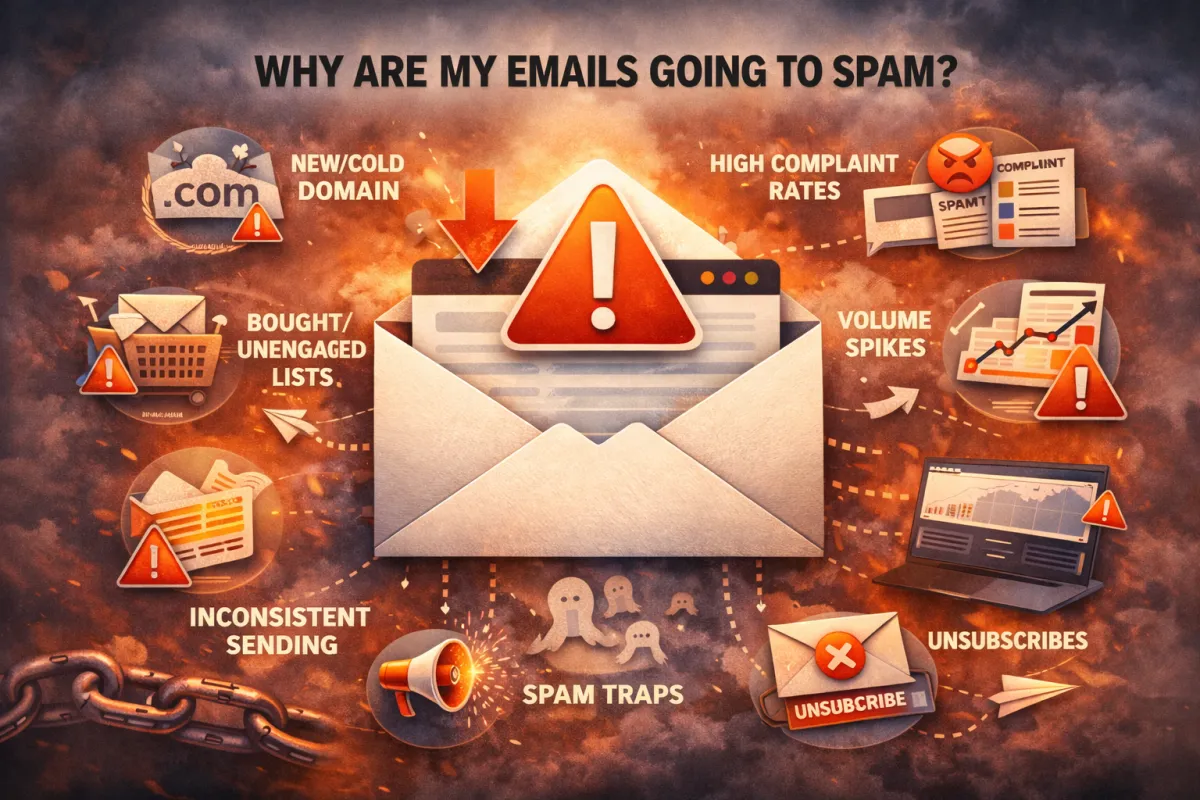
Email is the only channel where you can wake up, press send, and generate revenue from people who already know you—without paying a platform for every impression or click.
But that only works if your emails actually show up.
Not “delivered” in a technical sense.
Not “sent” from your ESP.
Visible. In the inbox. In front of real humans.
That’s what email deliverability really is:
The difference between “we sent 100,000 emails” and “100,000 people had a chance to buy.”
In 2025, inbox providers are ruthless.
They judge your domain, your IPs, your history, your list, your content, and your behaviour - every single send.
This guide is the A–Z playbook for how serious senders think about deliverability:
- How inboxes decide where to place your emails
- The core pillars that drive (or destroy) your reputation
- Which email deliverability tools actually matter
- How to build a simple system to improve email deliverability and protect revenue
Let’s start with how inboxes actually make decisions.
PART 1: How Inbox Providers Decide Where to Put Your Emails
When you hit “Send,” your email doesn’t just fly into a void and magically land somewhere.
Every major mailbox provider—Gmail, Outlook, Yahoo, corporate servers—runs your email through a decision process that looks roughly like this:
Who is sending?
Can we verify them?
Do people like their emails?
Does this particular message look safe and relevant?
Four big forces drive that decision:
Reputation
Engagement
Authentication
Content & context
Let’s break them down.
Reputation: The Long-Term Memory of Your Domain
Inbox providers track behaviour over time:
- Do people open your emails?
- Do they click?
- Do they reply?
- Do they delete without reading?
- Do they hit “This is spam”?
- Do your emails bounce a lot?
All of that rolls up into a sender reputation attached to:
- Your domain
- Your IPs
- Sometimes your “from” address and brand patterns
If reputation is strong, inboxes will bend over backwards to keep you in Primary/Inbox—even when you push hard on promotions.
If reputation is weak, even “good” campaigns get quietly downgraded.
Engagement: How Your Audience Behaves
Deliverability is democratic.
Inbox providers look at what your actual recipients do:
- Engaged lists (opens, clicks, replies) = you’re rewarded
- Disengaged lists (ignores, deletes, spam complaints) = you’re punished
Two brands can send nearly identical content and experience completely different results, purely because one has trained its audience to care - and the other hasn’t.
Authentication: Can They Prove You’re Legit?
This is where SPF, DKIM, and DMARC enter.
They answer basic questions for the inbox:
- Is this sender allowed to send from this domain? (SPF)
- Is this message cryptographically signed and untampered? (DKIM)
- What does the domain owner want us to do if something looks wrong? (DMARC)
Without these, you look at best sloppy, at worst dangerous.
A good email deliverability checker or email deliverability tester will always flag auth first, because so many issues start here.
Content & Context: What You Actually Send
Content alone rarely kills deliverability, but it can push a borderline sender over the edge.
Inboxes scan for:
- Suspicious structure (huge images, tiny text, strange links)
- Aggressive promo patterns (“100% FREE!!!” everywhere)
- Mismatches between your identity and what you send
They’re not just looking for “free money” keywords, they’re looking for content that behaves like known spam.
The key idea:
Inbox placement is not an accident. It’s your long-term behaviour, wrapped up in a single decision for every email.
PART 2: The 4 Pillars of Email Deliverability
If you strip all the noise away, email deliverability rests on four pillars:
- Authentication
- Infrastructure
- Reputation
- Behaviour
Get these right, and every campaign becomes easier.
Pillar 1: Authentication (SPF, DKIM, DMARC)
Think of this as your identity stack.
- SPF (Sender Policy Framework) – Tells inboxes which IPs/servers are allowed to send on behalf of your domain.
- DKIM (DomainKeys Identified Mail) – Adds a digital signature to each email that proves it wasn’t altered.
- DMARC (Domain-based Message Authentication, Reporting & Conformance) – Instructs inbox providers what to do when SPF/DKIM don’t line up (monitor, quarantine, reject).
If these are broken, missing, or half-configured on some platforms:
- Your emails are easier to spoof
I- nbox providers trust you less
- False positives (legit emails going to spam) become normal
Every serious email deliverability tools stack starts by checking this.
Pillar 2: Infrastructure (Domains, Subdomains, Warm-Up)
Deliverability lives or dies on the bones of your sending setup.
Key questions:
- Are you sending from one catch-all domain or a smart mix of primary + subdomains?
- Are cold outreach emails separated from marketing and transactional messages?
- Are your domains properly warmed before you scale volume?
- Are your IPs overloaded across multiple client accounts or brands?
Healthy infrastructure looks like:
- Distinct sending domains/subdomains for different purposes (e.g., marketing, transactional, outbound)
- A warmed, stable sending pattern for each
- No single IP or domain being abused with random blasts
When infrastructure is sound, every email deliverability tester report gets easier to fix.
Pillar 3: Reputation (Complaints, Bounces, Spam Traps)
Reputation is where a lot of damage quietly accumulates.
Three big enemies:
- Complaints – “This is spam” clicks are heavy negative votes
- Bounces – Hard bounces, invalid/dormant addresses, typos not caught
- Spam traps – Addresses that exist only to catch bad senders (often harvested from old/bought lists)
Over time, high complaint and bounce rates signal:
“This sender doesn’t respect consent or list quality.”
That’s when even your best content starts to drown.
Pillar 4: Behaviour (Frequency, Consistency, Audience Fit)
Inbox providers don’t just watch what you send; they watch how you send.
Healthy behaviour:
- Consistent cadence (not silent for months, then blasting everyone)
- Thoughtful segmentation (engaged vs inactive, buyers vs prospects)
- Reasonable volume growth (no insane jumps overnight)
- Relevant content mapped to lifecycle stages
Risky behaviour:
- Sending everything to everyone, all the time
- Hammering cold segments with heavy promo offers
- Spiking from a few hundred to tens of thousands of sends in days
- Treating email like a megaphone instead of a relationship channel
If your behaviour looks like a spammer’s, no email deliverability tools suite will save you.
PART 3: How to Check Your Email Deliverability
You can’t improve what you don’t measure.
A serious deliverability setup uses both tools and real-world tests.
Step 1: Use Email Deliverability Tools the Right Way
There are dozens of tools out there calling themselves:
- Email deliverability checker
- Email deliverability tester
- Email spam testing tools
They typically:
- Analyse your SPF/DKIM/DMARC
- Check blacklist status
- Scan content for risky patterns
- Provide seed lists to test inbox placement
These are useful but limited.
Treat them as dashboards, not drivers:
- Run key campaigns through them before sending
- Pay more attention to recurring issues than to one-off scores
- Keep screenshots and notes so you can track trends over time
If a tool keeps flagging the same structural problem, believe it.
Step 2: Run Seed Tests and Folder Checks
Tools that send to a seed list of inboxes give you a sense of:
- Inbox vs Promotions vs Spam across providers
- How your campaigns perform in different environments
But you can also build your own simple system:
- Create a small set of test inboxes (Gmail, Outlook, Yahoo, corporate domains)
- Add them to key segments and sends
- Before every big push, send a test and see where it lands
Make this routine:
- For major launches
- After any big change (new domain, new ESP, new IP)
- When you see unexplained drops in open rates
Step 3: Watch Your Live Metrics Like a Hawk
No email deliverability tester beats real recipients.
The three numbers that tell you most of what you need to know:
- Open rate by segment and mailbox provider (where possible)
- Spam complaint rate
- Bounce rate
Warning signs:
- Sudden open rate drops across multiple ISPs
- Complaint rate creeping up above your usual baseline
- Spikes in hard bounces from new lists or sources
When you see these, you don’t need to guess if there’s a deliverability problem. You already have your answer.
Step 4: Audit Regularly, Not Just in Emergencies
Most teams only think about deliverability when something is on fire.
Serious senders bake audits into their workflow:
Monthly:
- Check SPF/DKIM/DMARC
- Review list hygiene and inactive segments
- Review complaint/bounce trends
Quarterly:
- Review domains, tools, and IP usage
- Re-evaluate sending cadences and automation logic
- Perform a deeper email deliverability checker run with full seed lists
This is the difference between “we keep getting surprised by spam” and “we catch issues before they cost us.”
PART 4: How to Improve Email Deliverability (And Keep It That Way)
Improving deliverability isn’t about one hack. It’s about tightening every part of the system, in the right order.
Here’s the high-level playbook we follow when we fix this for clients.
1. Fix the Foundation: Authentication & Infrastructure
Start here. Always.
- Clean up SPF so you’re not over the lookup limit or missing providers
- Ensure DKIM is enabled and valid for every sending platform
- Configure DMARC with monitoring now; move to stricter policies as things stabilise
- Separate domains or subdomains for different types of sending (transactional vs marketing vs cold outbound)
- Warm up any new domains slowly and deliberately
Once this is in place, every campaign benefits.
2. Clean Your List and Respect Engagement
Next, fix what you’re feeding into the system.
- Remove hard bounces and clearly invalid addresses
- Aggressively suppress or downshift chronically inactive contacts
- Segment by recency and engagement, not just by tags or product lines
- Avoid dumping old event lists or purchased data straight into main campaigns
If you haven’t done it yet, pair this with the work from your “Why Are My Emails Going to Spam?” article:
Make list cleaning and segmentation non-negotiable.
3. Redesign Sending Patterns
Deliverability loves rhythm.
- Choose a realistic cadence and stick to it
- Stagger big campaigns instead of blasting the entire database at once
- Introduce re-engagement campaigns for cold segments instead of treating them like everyone else
- Cap daily and hourly volumes per domain/mailbox - especially in cold email
When you do this well, your metrics stop moving like a rollercoaster and start looking like a staircase.
4. Tune Content for Humans and Filters
You don’t need “robot-safe” emails—but you do need thoughtful ones.
- Reduce unnecessary links and tracking clutter
- Balance images with real text; avoid sending one giant image as the entire email
- Cut arrogant, over-hyped claims that feel like spam to both humans and filters
- Add more value-driven content between promotions: education, stories, use cases, customer proof
Here’s where you link internally:
- From your spam checker / tester article: show them how to use content testing wisely
- From your “why emails go to spam” article: show how content fits into the bigger picture
5. Build a Lightweight Deliverability Routine
You don’t need a full-time deliverability engineer. You need a checklist.
For example:
Weekly
- Check open rates by segment
- Scan for bounce/complaint spikes
- Run key templates through an email deliverability checker if something looks off
Monthly
- Review domain/IP health
- Revisit list hygiene rules
- Run a full email deliverability tester + seed test on main campaigns
Before big launches
- Test inbox placement
- Send to engaged segments first
- Monitor results in real time and throttle if needed
Over time, this becomes muscle memory.
Deliverability stops being a crisis, and becomes part of how you operate.
PART 5: When It’s Time to Talk to a Deliverability Specialist
If you’re sending:
- Cold email across multiple domains
- High-volume marketing campaigns for SaaS or ecommerce
- Critical transactional and lifecycle flows for your app
…then email deliverability is not an abstract concept. It’s a revenue protection layer.
There’s a point where:
- You’ve tweaked subject lines
- You’ve “cleaned the list” once
- You’ve run a few email deliverability tools
- You’ve read guides like this
…and your numbers still aren’t where they should be.
At that point, guessing is usually more expensive than help.
When we work with clients, we typically:
- Audit every part of their sending setup: domains, IPs, tools, SPF/DKIM/DMARC
- Run proper email deliverability tester workflows and inbox placement checks
- Map out risk by provider (Gmail, Outlook, corporate filters, etc.)
- Redesign domain and list strategy for scale
- Build an ongoing monitoring setup so issues are caught early, not after a bad quarter

If this feels important but overwhelming, that’s exactly what we fix before we scale cold email, lifecycle, and promotional campaigns.
A short call can:
- Show you where your real deliverability risks are
- Quantify how much revenue is likely being left in spam
- Give you a clear, prioritised plan to fix it
FAQs
1. What is email deliverability in simple terms?
Email deliverability is your ability to consistently land in the inbox (not spam or Promotions) of people you send to. It’s less about “was the email sent” and more about “did the recipient realistically see it?”
2. Do I need special email deliverability tools?
You don’t need every tool on the market, but you do need at least one reliable email deliverability checker and, ideally, a way to run seed tests. Tools give you visibility; your strategy does the actual fixing.
3. How long does it take to improve email deliverability?
Basic fixes can show results within a few sends. Rebuilding a damaged reputation and warming domains properly usually takes weeks to a few months, depending on how bad things were and how much you’re sending.
4. Can I fix deliverability just by changing subject lines and content?
Not if the real issues are infrastructure, authentication, or list quality. Content tuning helps, but it should come after you’ve fixed the underlying system.
5. Is it worth separating domains for different types of email?
In most serious setups, yes. Using distinct domains/subdomains for cold outbound, marketing, and transactional email gives you better control, clearer diagnostics, and reduced risk if one stream has problems.
© High Performing Emails, The Grow Revenue Company Inc. 2026 All Rights Reserved.